Part 1: the gated snare
SUS4 Gated Reverb is a reverb followed by a gate on the reverb only. The gate listens to whatever feeds the plugin, so on a snare channel it opens on each hit and shuts the tail after it. The dry snare passes through untouched and Mix sets the balance.
Load 80s Snare. The editor shows what you are about to hear: a short, fairly dark room, cut at around 133 ms.
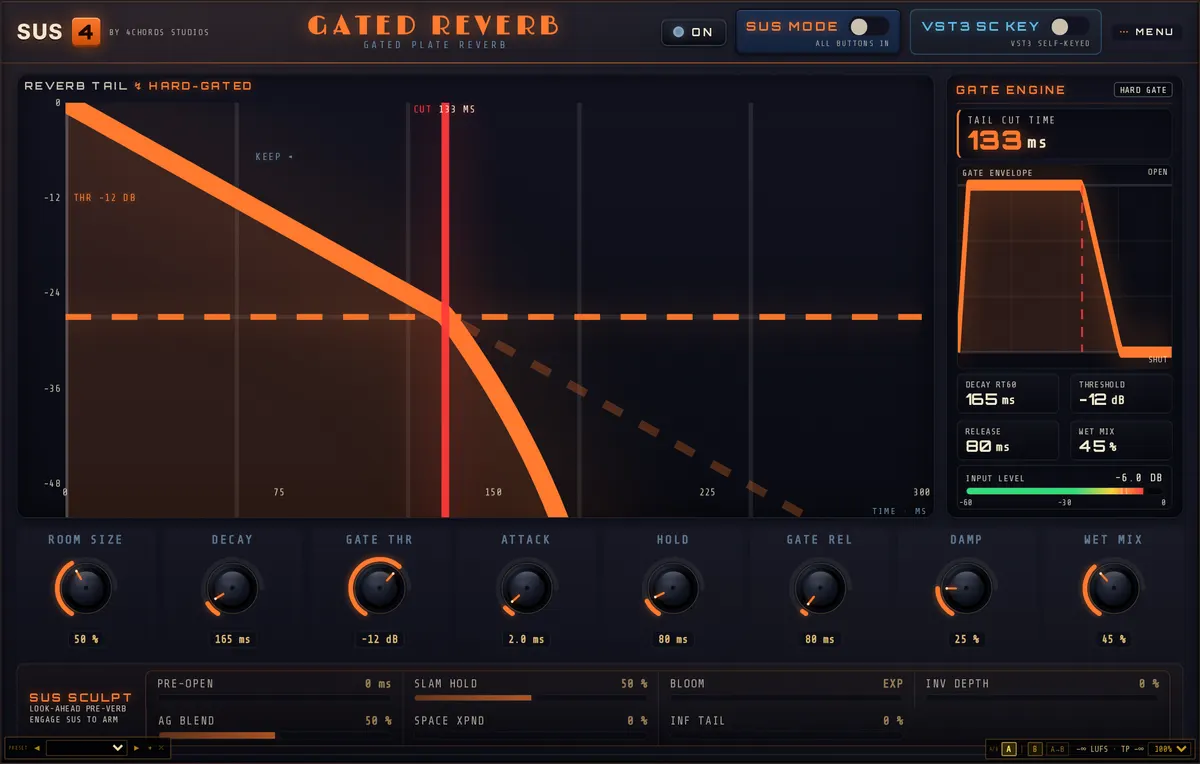
| Control | Setting | Why |
|---|---|---|
| Room Size | 50% | |
| Decay Time | 12% | The editor reads this as an RT60 of 165 ms |
| Gate Threshold | −12.0 dB | Range −60 to 0 dB |
| Gate Attack | 2.0 ms | Range 0.5 to 20 ms |
| Gate Hold | 80 ms | Range 10 to 500 ms |
| Gate Release | 80 ms | Range 10 ms to 2 s |
| HF Damping | 25% | Higher is darker |
| Mix | 45% |
Getting the gate right
The threshold is the control that makes or breaks this effect. At −12 dB it expects a well-recorded, fairly hot snare. If some backbeats sound dry, the gate isn’t opening for them: lower the threshold a few dB at a time. If the reverb blooms on ghost notes or hi-hat spill, raise it. You want every backbeat to trigger it and nothing else.
Then time the cut. Gate Hold keeps the gate open after the hit and Gate Release is how quickly it closes. Together they decide how long the burst lasts. The tail should stop before the next hit, so a quick song needs shorter settings than a slow one. Hold is not the same as Decay. Decay changes the reverb itself, Hold just keeps the gate open for longer.
If you would rather send several drums to one gated room, put the plugin on an aux, set Mix to 100% and send the snare (and toms, if you like) to it. The gate then listens to what arrives on the aux. For the classic trick of gating the snare room from a different drum, the VST3 has an External Sidechain Key: route the key track to the plugin’s sidechain input and switch it on. The Snare Verb (Ext Key) preset is set up for that.
Part 2: Crimson on the drum bus
SUS4 Crimson is a clean VCA compressor with a transformer-style input stage in front of it. Analog adds the transformer’s low and high-frequency shaping without adding noise. Drive sets how hard the input stage is pushed, and Mix blends the compressed signal with the dry one.
On a drum bus, load Drum Bus Punch. The 15 ms attack lets the front of each hit through before the compressor clamps down, which keeps the kit punchy rather than flat. The 228 ms release lets the level recover between beats, so the kit breathes with the groove.
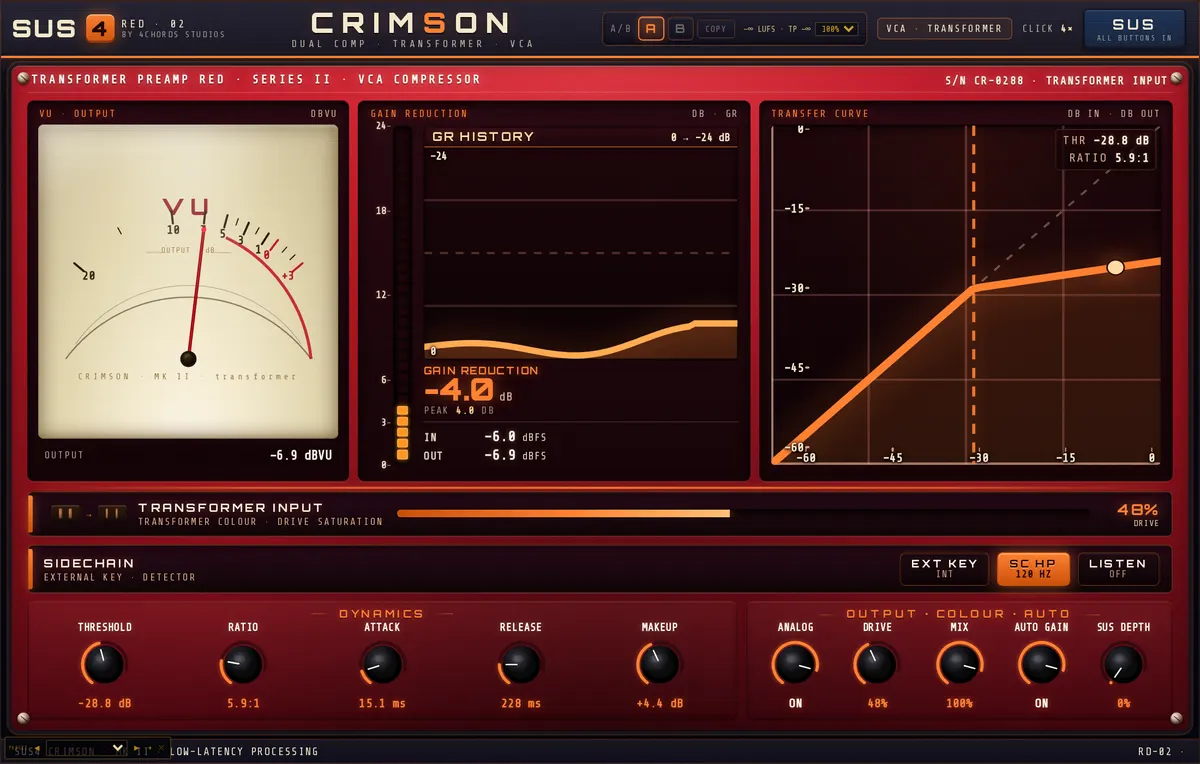
| Control | Setting | Why |
|---|---|---|
| Threshold / Ratio | −28.8 dB, 5.9:1 | |
| Attack / Release | 15.1 ms, 228 ms | |
| Makeup | +4.4 dB | |
| Analog | On | |
| Drive | 48% | |
| Mix | 100% | |
| Sidechain HP | 121 Hz | Range 20 to 500 Hz, on the detector only |
| Auto Gain | On |
Stop the kick running the show
Kick drums carry most of the energy on a drum bus. If the compressor hears all of it, every kick ducks the whole kit and the cymbals pump. Sidechain HP filters only what the compressor listens to, not what you hear. At 121 Hz the kick still comes through at full weight, but the snare and toms have more say in how hard the compressor works. Turn on Sidechain Listen to hear exactly what the detector hears, then switch it off again.
Set Threshold for about 3 to 4 dB of gain reduction on the loudest section. More than that and the kit starts to sound small, however good the drive is.
Parallel instead: keep the transients, add the weight
If Drum Bus Punch flattens a kit you like the dynamics of, try NY Parallel. It compresses much harder (−37.2 dB, 9.9:1, 40 ms attack, 554 ms release, +8.6 dB makeup) but blends it at a Mix of 55%, so the untouched transients sit on top of a thick, compressed body. Auto Gain is off in that preset, so check the level against bypass by ear.