Start from Vocal Silk, not from zero
Vocal Silk is the most useful starting point in the 1.3.1 bank for a sung lead: a gentle high-pass, a small cut in the low mids, a presence and air lift, 3.6:1 compression with a fast attack, a little saturation and the de-esser working at 6 kHz. None of it is extreme, which is the point. You are going to move three or four controls, not rebuild the chain.
Choosing the Vocal role on its own loads a similar, slightly softer starting point (80 Hz high-pass, −1.5 dB at 300 Hz, +2 dB at 5 kHz and 12 kHz, 3:1 at −18 dB). Vocal Silk goes further on presence and air, so it suits a vocal that has to cut through a busy arrangement.
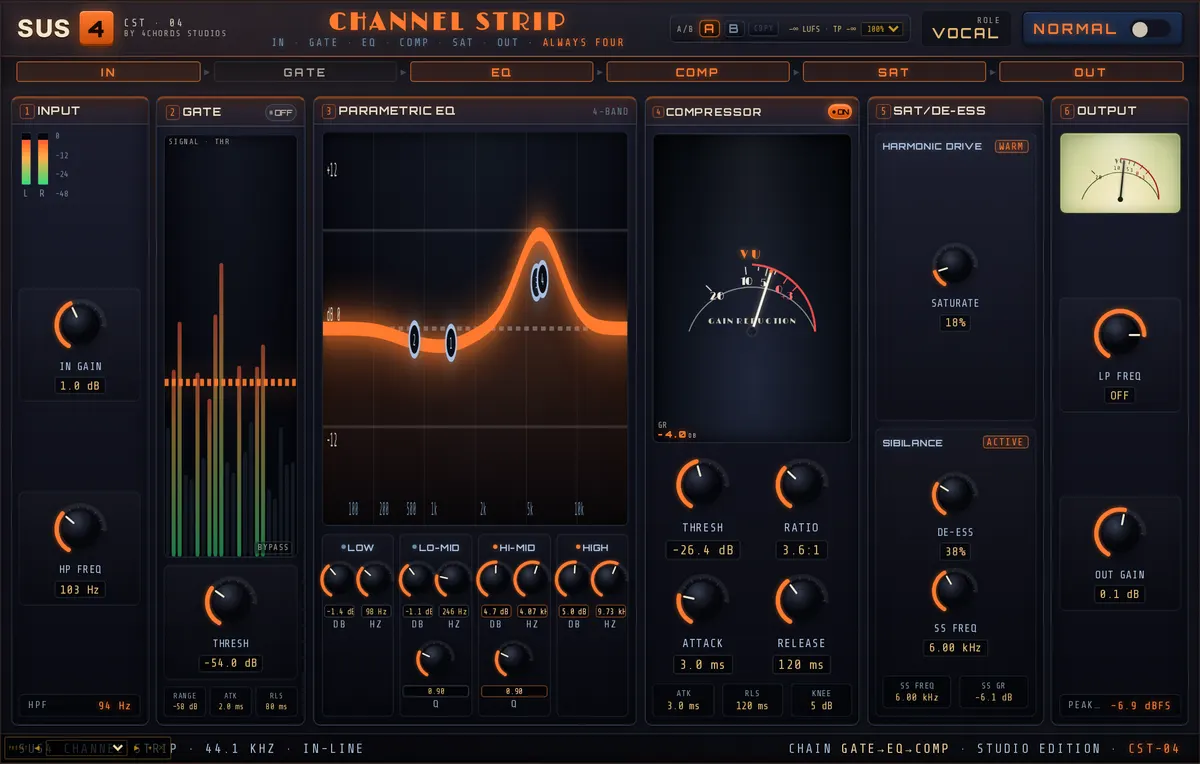
| Control | Setting | Why |
|---|---|---|
| HP Freq | 103 Hz | Removes handling noise and rumble below the voice |
| EQ Low | −1.4 dB at 98 Hz | |
| EQ Lo-Mid | −1.1 dB at 246 Hz, Q 0.90 | A gentle de-mud |
| EQ Hi-Mid | +4.7 dB at 4.07 kHz, Q 0.90 | Presence |
| EQ High | +5.0 dB shelf at 9.73 kHz | Air |
| Comp Thresh / Ratio | −26.4 dB, 3.6:1 | |
| Comp Attack / Release | 3.0 ms, 120 ms | |
| Saturation | 18% | |
| De-Esser / De-Ess Freq | 38%, 6.00 kHz | |
| Chain Order | Gate > EQ > Comp | |
| Auto Gain | On |
The high-pass: set it by ear, not by number
HP Freq runs from off up to 1 kHz. 103 Hz is a safe place for most voices, but a low male voice can lose weight there, and a thin, close-miked voice can often go higher. Sweep it up until you hear the chest of the voice start to go, then back off a little. If you are unsure, solo the vocal with the rest of the mix quiet and listen for the point where the voice stops sounding like the same person.
The Male Vocal preset is worth a look if the singer sits low: it high-passes at 94 Hz, cuts 2.9 dB at 202 Hz where chesty boxiness lives, and moves the de-esser down to 4 kHz.
Compression: aim for 3 to 6 dB on the loud bits
The compressor range is −60 to 0 dB for the threshold and 1:1 to 20:1 for the ratio. Leave the ratio at 3.6:1 and use the threshold. Loop the loudest line of the song and bring Comp Thresh down until the gain-reduction meter kicks to around 3 to 6 dB on the peaks and falls back to near zero in the quieter words. If it never lets go, the threshold is too low and the vocal will sound flat and squashed.
Attack at 3 ms is quick enough to catch consonants. If the vocal starts to lose its edge, lengthen the attack towards 10 ms so the front of each word gets through. A release of 120 ms recovers between words at most tempos. On slow ballads you can lengthen it so the level moves more smoothly.
De-essing: find the singer’s frequency
Sibilance sits in a different place for every singer and every microphone. De-Ess Freq covers 3 to 12 kHz. Loop a line with plenty of esses, then sweep the frequency slowly between about 5 and 8 kHz. You will hear a point where the esses soften the most for the least change to the rest of the voice. Stop there, then set the De-Esser amount.
Go easy. Too much de-essing turns "sister" into "thithter". If you need more than about 60% to control a harsh singer, look at the Hi-Mid boost first. A 4.7 dB lift at 4 kHz can be what is pushing the esses forward. The De-Ess Vocal preset shows the other approach: a narrower Hi-Mid Q of 2.00, the de-esser at 8.01 kHz and 70%.
Judge it fairly, then commit
A processed vocal is usually louder, and louder always sounds better for a few seconds. Auto Gain matches the output to the input’s long-term level, so bypassing the plugin compares tone and control rather than volume. It tracks slowly (over a couple of seconds), so it won’t undo the compressor’s work within a phrase.
Once you like it, switch Auto Gain off and set Output Gain (−24 to +12 dB) where the vocal sits in the mix. That way the level of the track is a decision you made, not one the plugin is making for you.
When to reach for something else
ChannelStrip is a complete insert, but it isn’t the only way. For a vocal that swings from a whisper to a belt, two gentle stages often beat one hard one: a slow leveller first, then a fast compressor. The SUS4 Lume-2A and SUS4 Strike-76 are built for exactly that pairing. If a single note rings out harshly only when it is loud, a dynamic EQ is more precise than a static cut.