How SUS4 Limiter works
There is no threshold knob. Input Gain (0 to +24 dB) pushes the signal into a brickwall set by Ceiling (0 to −3 dBTP), and the limiter turns down anything whose true, inter-sample peak would cross it. Below the ceiling it does nothing to the audio at all: the output is identical to the input, just delayed by the lookahead.
The ceiling is measured in dBTP (true peak) rather than sample peak. That matters because lossy encoders used by streaming services can create peaks between samples. A −1 dBTP ceiling leaves room for that.
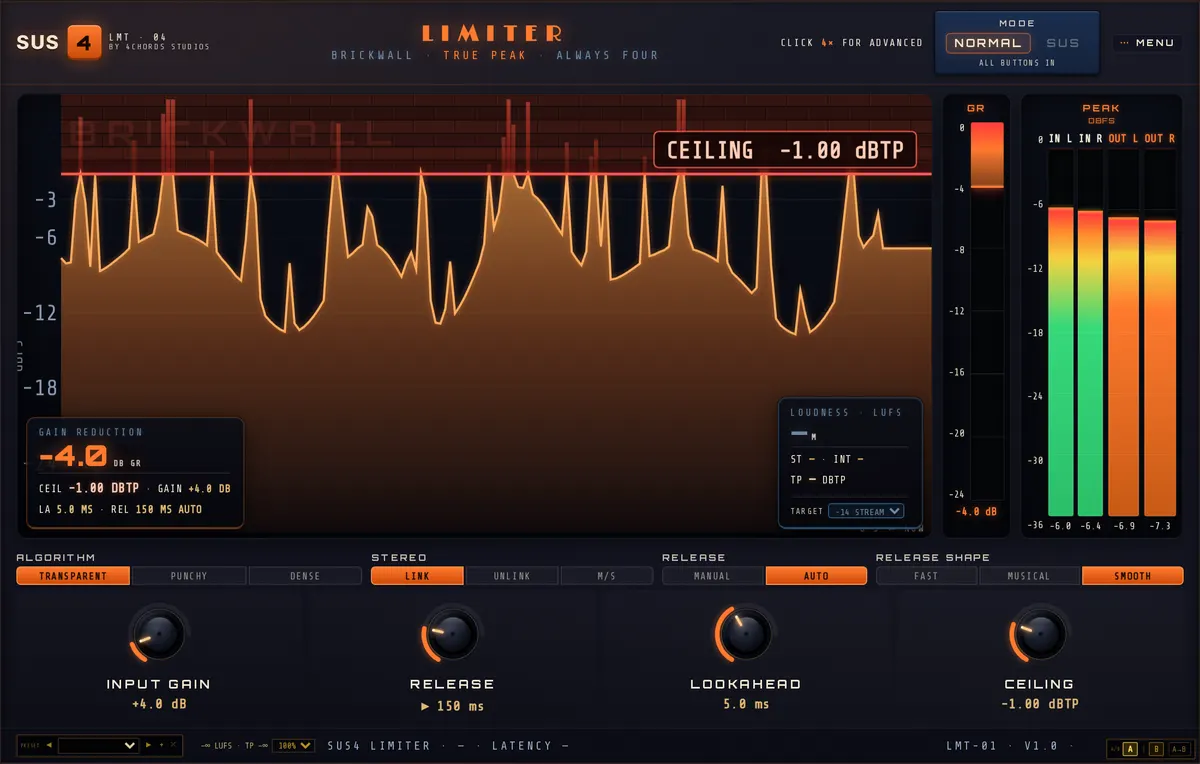
| Control | Setting | Why |
|---|---|---|
| Ceiling | −1.0 dBTP | |
| Input Gain | +4.0 dB | A starting point: adjust for your mix |
| Release | 150 ms, Auto | |
| Release Shape | Smooth | |
| Lookahead | 5.00 ms | |
| Algorithm | Transparent | |
| Stereo | Linked | |
| Loudness Target | −14 LUFS |
Reading the loudness panel
The loudness panel measures to the BS.1770-4 standard: Momentary (400 ms), Short-term (3 s), Integrated (the whole run, gated) and the maximum true peak. Integrated is the number the streaming services use, so it is the one to watch. Reset it and play the song through from the top to get a fair reading.
The Target setting only changes the readout, never the audio. It shows ▲ when you are louder than the target, ▼ when you are quieter and ✓ when you are within 0.5 LU. Raise Input Gain until you see ✓ over a whole play of the song, not just the chorus.
Transparent, Punchy or Dense?
Transparent is the cleanest. The gain eases down smoothly across the whole lookahead and is the safe choice for most full mixes, especially bass-heavy ones.
Punchy lets the front of each transient through before it reduces the gain, so drums keep their attack. The trade-off is distortion on low frequencies: at 6 dB of reduction with a 50 ms release, the plugin’s own measurements show 0.40% THD+N at 100 Hz and 2.2% at 50 Hz, against 0.001% at 1 kHz. Use it on mixes where the kick and snare carry the energy and the sub is under control.
Dense adds a soft clipper before the limiter for a louder, flatter result. It adds harmonics by design, so it belongs on genres that want that density, and needs checking on headphones for harshness.
Keeping the width
In Linked mode one gain is applied to both channels, so the stereo image never moves. The catch is that a loud centre element (a kick or a lead vocal) pulls down the sides every time it hits. If the reverbs and wide guitars seem to pump with the kick, switch Stereo to M/S. Mid and side are then limited separately, and the output still never exceeds the ceiling. The Wide Master M/S preset starts from there.
Know when to stop
Watch the gain-reduction readout. A few dB on the loudest peaks is normal. If you are regularly seeing 6 dB or more and the target still isn’t reached, the problem is usually in the mix: a boomy low end, an over-hyped top or an uncontrolled vocal. Fix that first and the limiter will have far less to do.
Level Match turns the output down to the input’s loudness so you can hear what the limiter is doing without being fooled by the volume jump. It is off by default. If you turn it on to listen, turn it off again before you bounce, or you will export a master at the original, quieter level.